Do you get anxious about packing your technology and cameras for air travel? You’re not alone.
With countless gadgets and expensive gear to think about, it can feel like a daunting task. You want your devices safe, secure, and ready for use at your destination, but figuring out the best way to pack them can be tricky.
Fear not, as we’re here to guide you through the process. Imagine cruising through airport security with ease and having peace of mind knowing your precious tech and cameras are perfectly packed. We’ll reveal smart, simple strategies to ensure your devices are well-protected during your flight. Stick with us, and you’ll learn how to keep your tech safe and sound, making your travel experience smoother than ever.

Credit: www.youtube.com
Choosing The Right Bags
Packing technology and cameras for air travel needs care. The right bag protects your gear from damage.
Choose bags that fit your devices and offer easy access during your trip.
Hard Case Vs Soft Case
Hard cases protect devices from drops and impacts. They have a sturdy outer shell and keep gear safe.
Soft cases are lighter and easier to carry. They offer some padding but less protection than hard cases.
- Hard cases resist water and shocks well
- Soft cases are flexible and fit in tight spaces
- Hard cases are heavier and less compact
- Soft cases often have extra pockets for cables
Dedicated Camera Bags
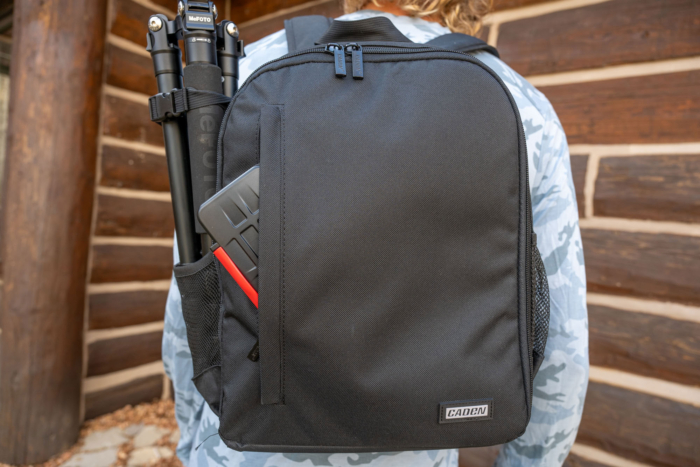
Camera bags have special compartments for lenses, bodies, and accessories. They keep everything organized.
They offer good padding and separate spaces to avoid scratches or damage during travel.
- Adjustable dividers to fit your gear
- Easy-to-access pockets for batteries and cards
- Comfortable straps for carrying
- Water-resistant materials for safety
Tech Organizers
Tech organizers keep cables, chargers, and small devices tidy. They prevent tangles and lost items.
Use organizers inside your main bag to separate small items for quick access.
- Multiple compartments and elastic bands
- Compact size fits in backpacks or carry-ons
- Protects fragile cables and adapters
- Keeps everything in one place

Credit: www.youtube.com
Protecting Your Devices
Packing technology and cameras for air travel needs care. Devices face rough handling and jostling in luggage.
Proper protection prevents damage and keeps your gear safe during the trip.
Using Padding And Dividers
Use padded bags or cases to cushion your devices. Padding absorbs shocks and stops scratches.
Dividers inside bags separate items. They stop devices from hitting each other during travel.
- Use foam or thick fabric padding
- Choose bags with adjustable dividers
- Wrap fragile items with bubble wrap
- Fill empty spaces to avoid movement
Screen And Lens Protection
Protect screens and lenses with special covers or cases. These surfaces are easy to scratch or break.
Use lens caps and screen protectors. They keep dust and scratches away during packing and travel.
- Attach screen protectors before packing
- Use hard lens caps on all camera lenses
- Store lenses separately if possible
- Clean screens and lenses before packing
Waterproofing And Dustproofing
Keep your devices dry and clean. Water and dust can damage electronics and lenses quickly.
Use waterproof bags or covers to guard against moisture. Dustproof bags help keep dirt out.
- Place devices in sealed plastic or silicone bags
- Use silica gel packs to absorb moisture
- Choose bags with waterproof zippers or seals
- Store camera gear in dustproof compartments
Packing Smart For Security Checks
Traveling with technology and cameras needs smart packing. Security checks can be faster and less stressful.
Organize your gear so you can show it quickly to airport staff. Follow rules to avoid delays and keep your items safe.
Organizing For Quick Access
Keep your technology and cameras in easy-to-reach places. Use clear bags or separate compartments in your carry-on.
Place laptops, tablets, and cameras on top or in front. This helps you take them out fast during screening.
- Use padded bags with compartments
- Keep cords and chargers untangled
- Store small accessories in clear pouches
Handling Lithium Batteries
Lithium batteries can be risky on planes. Carry them in your hand luggage, not checked bags.
Protect battery terminals from short circuits. Use tape or keep batteries in original packaging.
- Remove batteries from spare devices
- Limit the number of spare batteries
- Follow airline rules for battery size and quantity
Dealing With Tsa Regulations
TSA has rules for carrying electronics and batteries. Know what you can bring and how to pack it.
Declare large devices like laptops and cameras at security checkpoints. This speeds up the process.
- Remove laptops from bags for separate screening
- Keep devices switched off during screening
- Check TSA website for current rules before flying
Managing Cables And Accessories
Packing technology and cameras for air travel needs good cable and accessory management. Tangled cables and missing parts cause stress and delay.
Organizing your cables and accessories protects your gear. It makes finding what you need quick and easy during your trip.
Cable Management Tips
Keep cables neat by using cable ties or Velcro straps. This stops them from tangling inside your bag.
Wrap cables in a loose coil. Avoid bending or folding cables sharply to prevent damage.
- Use small pouches or zip-lock bags for different cables
- Label cables with tags or colored tape for easy ID
- Store charging cables separately from data cables
Essential Accessories To Carry
Bring adapters and converters that fit your devices and destination outlets. This keeps your tech powered all trip.
Include cleaning kits and lens cloths to keep your cameras clear and working well.
- Universal power adapter
- Extra memory cards and batteries
- Lens cleaning kit
- Portable charger or power bank
- Small screwdriver set for quick fixes
Keeping Spares Handy
Always pack spare cables and batteries in your carry-on bag. This avoids trouble if something stops working.
Keep spares organized and easy to reach. That way, you can fix or replace parts fast during travel.
- Extra USB cables
- Backup camera batteries
- Spare chargers and plugs
- Replacement memory cards
Preparing Your Gear For Flight
Packing technology and cameras for air travel needs careful planning. Protect your gear to avoid damage and delays.
Follow simple steps to keep your devices safe and ready to use after the flight.
Removing Batteries When Required
Some airlines ask you to remove batteries from devices. This helps prevent fires during the flight.
Check your airline rules before packing. Remove batteries from cameras and other gear if needed.
- Take out lithium-ion batteries carefully
- Store batteries in a separate, safe case
- Cover battery terminals with tape to stop short circuits
Backing Up Data Before Travel
Backing up your data protects photos and videos from loss. Save copies before you leave.
Use cloud storage or external drives for backups. This keeps your files safe if gear is lost or damaged.
- Upload important files to cloud services
- Copy data to a portable hard drive
- Check backups work before traveling
Turning Off Devices Properly
Turn off all devices fully before packing. This saves battery and avoids accidental activation.
Do not just put devices in sleep mode. Shut them down to protect internal parts during the flight.
- Close all apps before turning off
- Use the power button to shut down devices
- Wait a few seconds to ensure power is off
Credit: gearjunkie.com
Handling Your Gear During Transit
Traveling with technology and cameras needs care. Your gear must stay safe from damage and theft.
Good packing and smart choices help protect your equipment during the trip.
Carry-on Vs Checked Luggage
Carry-on luggage keeps your gear close and safe. Checked bags can get lost or damaged.
Always try to bring valuable technology and cameras in your carry-on bag.
- Carry-on bags offer better control and security.
- Checked luggage faces rough handling and risk of theft.
- Check airline rules for carry-on size and weight.
- Keep batteries and accessories in your carry-on.
Using Protective Cases On The Go
Protective cases guard your gear from bumps and drops. They keep devices safe inside.
Use hard cases for cameras and fragile devices. Soft cases work for cables and small items.
- Choose cases with foam padding for extra protection.
- Waterproof cases protect against rain and spills.
- Organize gear inside cases to avoid scratches.
- Label your cases to find items quickly.
Dealing With Unexpected Delays
Delays can happen during travel. You might wait hours at the airport or lose your bags.
Prepare for delays by keeping essentials handy. Charge devices and pack snacks to stay comfortable.
- Carry extra batteries or power banks for your devices.
- Keep important gear in your carry-on to avoid loss.
- Have backup memory cards or storage options.
- Stay calm and check with airline staff for updates.
Frequently Asked Questions
How Should I Pack Cameras For Air Travel?
Pack cameras in padded, hard-shell cases to protect them from shocks. Use lens caps and wrap lenses in microfiber cloths. Keep batteries and accessories organized in separate compartments to avoid damage or loss during transit.
Can I Carry Tech Devices In Carry-on Luggage?
Yes, carry-on luggage is ideal for tech devices. It allows you to keep your valuable gadgets safe and accessible during the flight. Always follow airline security rules for electronics screening.
What Precautions Protect Tech From Airport Security Scans?
Remove laptops and cameras from bags during security checks. Place them in separate bins to avoid damage. Use TSA-approved locks and avoid wrapping devices too tightly to prevent interference with scans.
Is It Safe To Check-in Camera Equipment?
Checking in camera gear is riskier due to potential rough handling. If necessary, use sturdy, well-padded cases and label them fragile. Carry valuable or sensitive equipment as carry-on whenever possible.
Conclusion
Packing your tech and cameras carefully keeps them safe during flights. Use padded cases and secure all accessories tightly. Keep batteries and chargers accessible for airport checks. Organize your gear to avoid damage and confusion. This simple care saves you stress and protects your valuable devices.
Travel smart, and enjoy capturing every moment with peace of mind.